
How to Register on the Golo789 App
New to Golo789 Game? Here’s the easiest and fastest way to create your account and claim the 100% Welcome Bonus in less than 1 minute!
Quick Requirements
Step-by-Step Registration (With Pictures Explanation)
Step 1: Open the Golo789 App
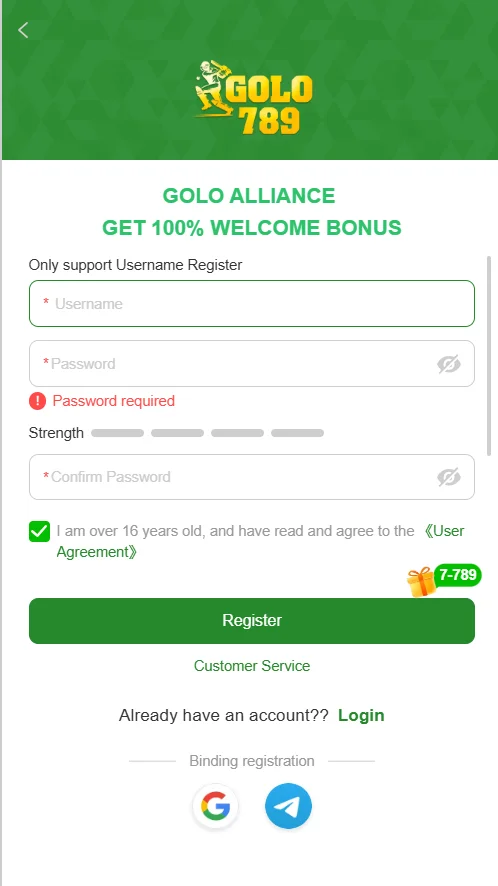
Launch the app. You’ll see a green screen with the Golo789 logo and “GET 100% WELCOME BONUS”.
Step 2: Fill in Your Username
Type your desired username in the first box (the one with a red *). Example: luckyplayer88, vipjohn2025 → Make sure it’s unique and easy for you to remember.
Step 3: Create a Strong Password
In the “Password” field, enter a secure password (at least 8 characters). Look at the strength bar underneath:
Step 4: Confirm Your Password
Re-type the exact same password in the “Confirm Password” box.
Step 5: Confirm You’re Over 18
Tick the checkbox that says: “I am over 18 years old, and have read and agree to the User Agreement” (Tap the blue “User Agreement” link if you want to read it first)
Step 6: Tap the Green “Register” Button
Click the big green button at the bottom. You’re now registered and the 100% Welcome Bonus is automatically added!
Step 7 (Optional but Recommended):
Bind Google or Telegram After registering, you’ll see Google and Telegram buttons at the bottom. Linking one of them makes logging in faster and helps recover your account if needed.
Done! What Happens Next?
Common Questions
Q: Username already taken?
Add numbers or change spelling (e.g., dragon88 → dragon888pro)
Q: Forgot password later?
Use the “Forgot Password” option on the login page or contact live chat.
Q: Need help?
Tap the “Customer Service” button (usually 24/7 live chat), they reply in seconds.