
How to Login to Golo789 App
Already signed up on Golo789 Game? Logging in is super simple and takes seconds! Use your phone number or username to access your account and start playing with your 100% Welcome Bonus.
Quick Requirements
Step-by-Step Login Guide (With Screen Tips)
Step 1: Open the Golo789 App Launch the app
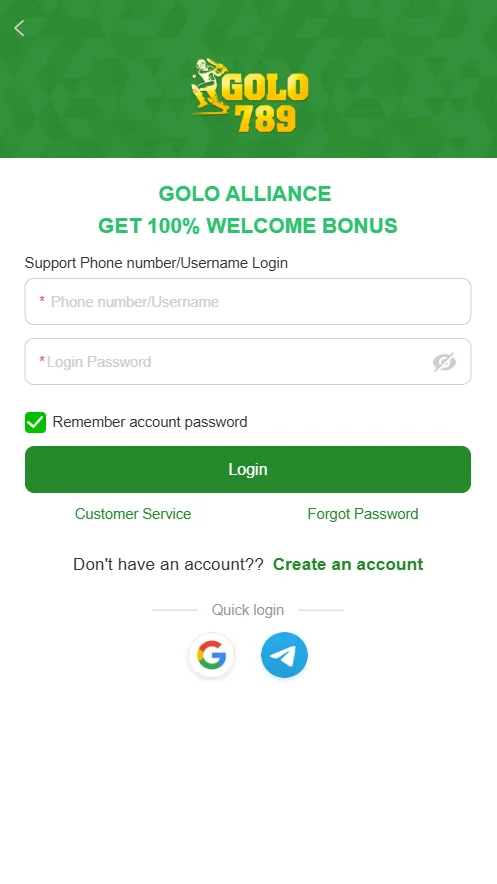
You’ll land on the green login screen with the Golo789 logo and “GET 100% WELCOME BONUS” at the top.
Step 2: Enter Your Phone Number or Username
In the first box (marked with a red *), type your phone number (including country code, e.g., +1-123-456-7890) or username (e.g., luckyplayer88). Tip: If you forgot which one you used, check your registration email or notes.
Step 3: Input Your Password
In the “Login Password” field, type your secure password. Tap the eye icon (👁️) next to it to show/hide the password for accuracy.
Step 4: Optional – Remember Me
Check the box for “Remember account password” if you’re on a trusted device. This auto-fills next time (uncheck for shared devices).
Step 5: Tap the Green “Login” Button
Hit the big green “Login” button at the bottom. You’re in! Your dashboard loads with games, wallet, and bonuses ready.
Step 6 (Alternative):
Quick Login with Google or Telegram For faster access, tap the Google (G) or Telegram (blue plane) icons below. → If linked during registration, it’ll log you in instantly without typing.
Forgot Your Password? No Problem!
New User? Create an Account
Common Questions
Q: Login failed?
Double-check spelling, caps lock, or internet. Clear app cache if stuck.
Q: Two-factor code needed?
If enabled, enter the SMS code sent to your phone.
Q: Need instant help?
Tap “Customer Service” (24/7 live chat), agents respond in seconds.